Products & Services > Publications > Publication Services > Park-Produced Publications > The Grid

Park-Produced Publications


The Grid

The grid serves to give structure to the layout and helps organize and position the material into a logical sequence. Components are positioned according to the grid lines. The network of non-printing vertical lines and printed horizontal bars create modules, separated by small spaces. Series of modules can be grouped for text, illustrations, or white space.

The grid is currently offered in two formats—vertical site bulletin and rack card. Each has a bleed version and a non-bleed version. Both are based on standard paper sizes available at most printers. The use and content of the publication will determine which format to use. The grids are available on the NPS Graphic Identity Program website (NPS users only). The format for the horizontal grid will be added shortly to this web site.

 
Vertical site bulletin grid

Vertical Grid

Final size is 8" x 14", folded accordion style. It can be reproduced as a one-sided or two-sided sheet. It is well suited for interpretive brochures, guides, schedules, mailers, or left unfolded as a poster. It can even be enlarged when used as a poster. It has three columns, the left is used for titles, illustrations, and white space, the others for text and illustrations.

Petroglyph Canyon site bulletin, side 1 Petroglyph Canyon site bulletin, side 2

Above: Petroglyph Canyon site bulletin (full bleed version), showing side 1 (left) and side 2 (right). Click on either image to retrieve a PDF version of the site bulletin.

Rack card grid

Rack Card Grid

Final size is 4" x 9", printed vertically, and left unfolded. It can be used in a free-standing rack for schedules, travel directions, or other short messages, mailouts, or to be handed out at entrance stations. Some parks are printing these in color and displaying them in commercial racks outside the park, where there is significant competition for attention. The value of the bold, clean, identifiable, site bulletin look is particularly apparent in this situation. Its use may suggest printing on stiffer paper. Because of its small size, this format uses only one column.

Rack card, full bleed version Rack card, non-bleen version Back side of both rack card versions

Above (left to right): rack card (full bleed version); rack card (non-bleed version); and side two of both full bleed and non-bleed versions. Click on an image to retrieve a PDF version of each rack card.

Bands and Bars

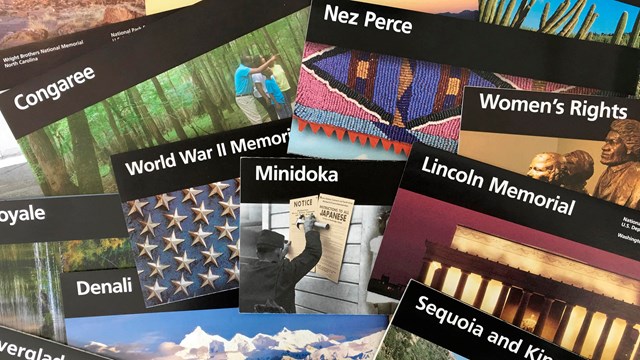
Title Band: The black top title band holds the park name (example: Canyonlands) on the left and National Park Service, U.S. Department of the Interior, full park name and designation (example: Canyonlands National Park), and arrowhead on the right. This band is 1-1/8" deep and extends to the top, left, and right edges of the sheet; it "bleeds" off the sheet. For use on the rack card the size of the band must be scaled down to 7/8" deep. The title band does not appear on the back of the sheet. As the strongest, single feature in the system, this band should always be used uniformly and must be printed at a print shop because office copiers are not able to bleed off the edges and will produce a weak and faded appearance. To adapt the title band to office copier use, the "no bleed" templates use a title band that stops 1/4" from the top and sides of the page.

Bars: Divider bars aid in organizing major groups of information as horizontal areas of pictures and text. They serve as the graphic device against which subtitles and text are positioned. They reinforce the horizontal quality of the layout but separate content into handy, easily followed units. The bars are 3 points thick and extend horizontally from the left edge of the first grid module to the right edge of the last grid module. They do not bleed off the page. They are spaced between sections by a non-printing spacer built into the templates.

Layout

The alignment of all the elements is very important. Everything you add to the grid—text, art, bars, or illustrations—must be square on the page.

A general concept for the balance of type, illustrations, and white space is one-third text, one-third art or photos, and one-third white space. This isn’t always possible, but it shows the importance of breathing room in a layout. Simplicity carries visual power; resist the use of boxes, borders, and generic decorations. Avoid the use of grayed areas that muddy the general appearance and don’t print well.

Page layout programs offer an option to show pages as "thumbnails," very small printouts that allow you to see the look of a page without being confused with details. It's easy to see if a design is too dense with text, illustrations, or bars.

Site bulletin with accordion style fold

Folds

The vertical site bulletin is folded "accordion style." It allows the top panel to be visible and the bulletin to unfold easily. To duplicate this fold, place the bulletin on a flat surface, face-up. Fold it in half by bringing the bottom edge up to the top. The front face of the bulletin is now on the inside. Bring the bottom edge down to the fold in the middle; flip the bulletin and do the same. The bulletin now has three folds and four panels. The top and bottom panels of the front now face out. This is not the same as a letter fold. Make sure your printer understands that you’re asking for something other than letter fold.

Typography »
Author: Harpers Ferry Center
Last Updated: Wednesday, 24-Dec-2008 09:35:11 Eastern Standard Time
http://www.nps.gov/hfc/products/pubs/pubs-sb-05.htm